
The Clean Desk Charging Solution: Elecdov CE06S 3-In-1 Magnetic Charging Station for Samsung
Executive Summary: If you're tired of juggling multiple chargers, wrestling with tangled cables, and searching for available outlets during important video calls, you're not alone. The average remote worker manages 3.2 charging cables on their desk—for a phone, smartwatch, and wireless earbuds. That's three cables, three adapters, and three power strips worth of clutter.
This guide explores how the Elecdov CE06S 3-In-1 Magnetic Charging Station transforms workspace charging from a logistics challenge into a streamlined, single-cable solution. We'll cover the technology behind Qi2 magnetic alignment, compatibility with Samsung's latest devices, and why this charging station belongs in every productive desktop setup.
Quick Navigation

The Elecdov CE06S 3-In-1 Magnetic Charging Station delivers clean, efficient power for Samsung devices
1. The Cable Clutter Problem in Modern Workspaces
1.1 What's Happening on Your Desk Right Now
Picture this scenario: You're on a critical video call with a client. Your phone battery icon is flashing red at 8%. You need to take notes, reference a document, and keep the call connected—but your charging cable is buried under a stack of papers, and the nearest free outlet is behind your desk, requiring you to disconnect your laptop to make room.
This isn't just an inconvenience. Cable clutter directly impacts productivity. Studies consistently show that physical disorganization leads to mental clutter, with workers spending an average of 1.5 hours per week just managing charging cables and searching for adapters.

The typical workspace charging mess: multiple cables, adapters, and power strips competing for limited desk space
1.2 The Video Call Charging Crisis
In the era of Microsoft Teams, Zoom, and Google Meet calls, we face a new challenge: video call charging anxiety. Here's how it typically plays out:
- Draining during extended calls: A 90-minute video conference can consume 15-25% of your battery, especially with Wi-Fi streaming
- Feeding while meetings: Many workers can't join a call with acharging cable plugged in—this looks unprofessional on camera
- Emergency charging sprints: The mad dash to find a charge before your next meeting wastes valuable time
- Hot desking complications: Shared workspaces rarely have enough outlets for everyone
1.3 Remote Work and Hybrid Office Trends in 2026
The workplace continues to evolve. According to recent industry surveys, 42% of knowledge workers now operate in hybrid arrangements, splitting their time between home offices and corporate spaces. This shift has created unprecedented demands on personal charging infrastructure.
Microsoft's 2026 Build innovations introduced AI-integrated smart workspaces that anticipate your needs—including automated charging optimization. As these AI-enhanced environments become standard, having a dedicated, organized charging station becomes less of a luxury and more of a workspace essential.
The Productivity Math
If you spend just 10 minutes per day managing charging cables, that adds up to 40 hours annually—equivalent to a full work week. A dedicated charging station recovers this time and eliminates the cognitive load of "where did I put that cable?"
2. Introducing Magnetic Wireless Charging
2.1 How Magnetic Alignment Changes Everything
Traditional wireless charging demanded precise placement. Miss the charging sweet spot by even a few millimeters, and you'd wake up to a phone that hadn't charged at all. Magnetic charging solves this fundamentally by using precision-aligned magnets that snap your device into the optimal position automatically.
The Elecdov CE06S utilizes the Qi2 open standard, which incorporates magnetic positioning as a core component. This means:
- Snap-to-charge: Your device finds the charging position instantly—no adjustment needed
- Visual confirmation: Most phones display a subtle animation confirming correct placement
- Full efficiency: Perfect alignment delivers maximum power transfer every time
- One-handed operation: No need to peer at your desk to find the "right spot"
2.2 Three Devices, One Station
The CE06S charges three devices simultaneously from a single power adapter:
| Device Slot | Maximum Power Output | Ideal For |
|---|---|---|
| Center (Phone) | 15W | Samsung Galaxy smartphones (S series, Z Fold, Z Flip) |
| Right (Watch) | 2.5W | Galaxy Watch (all generations) |
| Left (Earbuds) | 5W | Galaxy Buds case with wireless charging |
This tri-device architecture eliminates the traditional charger sprawl. Instead of three separate charging cables occupying your desk, you have one sleek station that handles everything.

Three devices charge simultaneously from a single compact station—no cables required
2.3 Why Magnetic Charging Excels for Desk Setups
A wireless charging station integrates seamlessly into professional environments in ways cable-based charging cannot:
- No visible cable routing: The charging pad connects to power once; no cables snake across your desk
- Meeting-ready aesthetics: A modern charging station looks intentional—like a desk accessory, not a kludge
- Flexible device handling: Grab your phone for a quick walk without unplugging anything
- Shared workspace friendly: Coworkers can use the station without your specific cable
3. Technical Specifications & Certifications
3.1 Power Specifications
| Specification | Value |
|---|---|
| Input (Power Adapter) | 9V/3A or 9V/2.5A |
| Phone Output (Max) | 15W |
| Smartwatch Output (Max) | 2.5W |
| Earbuds Case Output (Max) | 5W |
| Total Combined Output | 22.5W |
3.2 Physical Specifications
| Dimension | Value |
|---|---|
| Length | 5.67 inches (144mm) |
| Width | 5.60 inches (142mm) |
| Height | 1.74 inches (44mm) |
| Weight | 9.98 oz (283g) |
Despite packing three device chargers, the CE06S maintains a compact footprint roughly the size of a large smartphone. At just under 10 ounces, it's substantial enough to stay anchored to your desk but light enough to relocate between home and office as needed.
3.3 Certifications
FCC certification ensures the CE06S meets strict electromagnetic interference and safety standards established by the Federal Communications Commission. This certification means:
- Safe electromagnetic emissions: Won't interfere with wireless keyboards, mice, or Wi-Fi routers
- Tested electrical safety: Built-in protections against over-current, over-voltage, and thermal runaway
- Verified charging compliance: Meets Qi wireless charging protocol specifications for safe, efficient power transfer
- Quality manufacturing: Produced in facilities meeting FCC documentation and testing requirements
Certification Matters
Counterfeit or uncertified wireless chargers pose real dangers: overheating, device damage, and even fire hazards. The FCC mark on your Elecdov CE06S isn't bureaucratic overhead—it's your assurance that this charger has been rigorously tested for safe operation alongside your $1,200+ flagship devices.
3.4 Efficiency and Thermal Management
Wireless charging generates heat—that's physics. However, the CE06S incorporates several design features to manage thermal output:
- Heat-dissipating baseplate: Aluminum core pulls heat away from charging coils
- Intelligent power throttling: When temperatures rise, output reduces gradually—not abruptly—to maintain charging without damage
- Ambient monitoring: The charger adjusts based on environmental conditions
- Foreign object detection: Won't overheat if metallic objects (keys, coins) appear between device and charger
4. Understanding Qi2 Technology
4.1 What Makes Qi2 Different
Qi2 (pronounced "chee two") represents the next evolution of the Qi wireless charging standard, developed by the Wireless Power Consortium. While Qi enabled inductive charging for over a decade, Qi2 introduces several fundamental improvements:
- Magnetic alignment as core requirement: Unlike original Qi (which made alignment optional), Qi2 requires the magnetic positioning that transforms user experience
- Higher power profiles: Supports 15W+ charging that was previously unavailable in the Qi standard
- Improved efficiency: Better power conversion reduces energy waste as heat
- Extended device identity: Devices can negotiate optimal charging parameters with the power source
4.2 Magnetic Charging Adoption in 2026
Qi2 adoption has accelerated dramatically since its commercial debut. Industry analysts estimate over 60% of new flagship smartphones now support Qi2 magnetic charging, including the entire Samsung Galaxy S and Z series. This rapid adoption reflects consumer demand for simpler, more reliable charging experiences.
TheSamsung Galaxy Z Flip 7, released in June 2026, exemplifies this trend with its enhanced magnetic charging integration. Thesedevices snap directly onto Qi2 chargers without requiring cases or accessories—a seamless experience that makes traditional wired charging feel positively archaic.
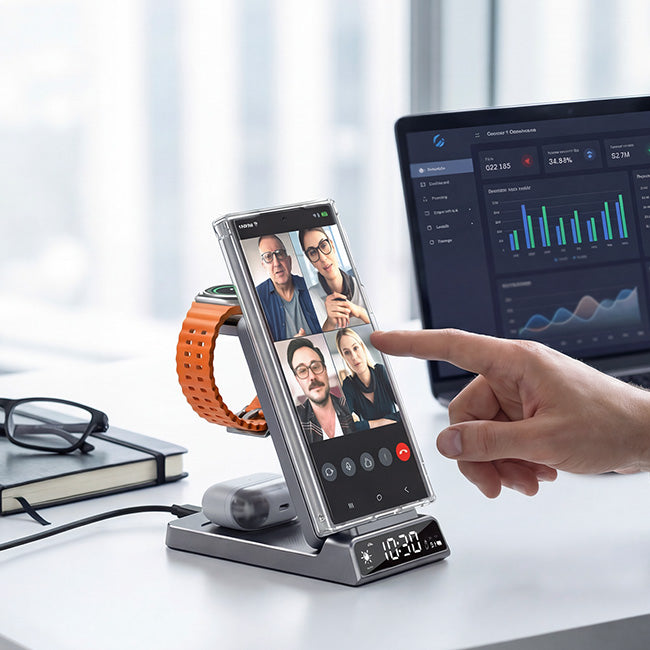
A clean, organized multi-device desk setup powered by magnetic wireless charging
4.3 Backward Compatibility
While Qi2 delivers the best experience with Qi2-capable devices, the Elecdov CE06S maintains full backward compatibility:
- Original Qi devices: Charge at standard 5W or 10W (device-dependent)
- MagSafe accessories: Some MagSafe-compatible devices from other brands will align magnetically
- Generic Qi earbuds cases: Charge at standard 5W regardless of brand
This flexibility means the CE06S remains useful even as you upgrade devices over time—not a trivial consideration when keeping electronics for 3-5 years is standard practice.
5. Device Compatibility Guide
5.1 Samsung Galaxy Smartphones
The CE06S provides magnetic snap and fast charging for the full Samsung Galaxy ecosystem:
| Device Series | Full Support | Notes |
|---|---|---|
| Galaxy Z Fold 7 | ✅ Yes | 15W fast charge, magnetic snap |
| Galaxy Z Flip 7 | ✅ Yes | 15W fast charge, magnetic snap |
| Galaxy S26 Ultra | ✅ Yes | 15W fast charge, magnetic snap |
| Galaxy S26 / S26+ | ✅ Yes | 15W fast charge, magnetic snap |
| Galaxy S25 Ultra | ✅ Yes | 15W fast charge, magnetic snap |
| Galaxy S24 Ultra / S24+ | ✅ Yes | 15W fast charge, magnetic snap |
| Galaxy S23 Ultra / S23+ | ✅ Yes | 15W fast charge, magnetic snap |
| Galaxy S22 / S22+ / S22 Ultra | ✅ Yes | 15W fast charge, magnetic snap |
| Galaxy S21 / S21+ / S21 Ultra | ✅ Yes | 15W fast charge, magnetic snap |
| Galaxy S20+ / S20 Ultra / Note 20 | ✅ Yes | 10W charge, manual placement |
5.2 Apple iPhones
While optimized for Samsung, the CE06S works with iPhones featuring wireless charging:
| Device Series | Support Level | Notes |
|---|---|---|
| iPhone 17 series | ✅ Yes | 7.5W, magnetic alignment |
| iPhone 16 series | ✅ Yes | 7.5W, magnetic alignment |
| iPhone 15 series | ✅ Yes | 7.5W, magnetic alignment |
| iPhone 14 series | ✅ Yes | 7.5W, magnetic alignment |
| iPhone 13 / 12 series | ✅ Yes | 7.5W, magnetic alignment |
Note: Apple devices using the Lightning port (iPhone 12-14) won't achieve 15W charging on non-Apple chargers due to proprietary limitations. This is an Apple software restriction, not a hardware limitation of the CE06S.
5.3 Smartwatches
The CE06S's dedicated watch charging slot supports:
| Device | Compatibility |
|---|---|
| Galaxy Watch Ultra | ✅ Full |
| Galaxy Watch 8 / 7 / 6 | ✅ Full |
| Galaxy Watch 6 Classic | ✅ Full |
| Galaxy Watch 5 / 5 Pro | ✅ Full |
| Galaxy Watch 4 / 4 Classic | ✅ Full |
| Galaxy Watch 3 / Active 2 | ✅ Full |
| Galaxy Watch Active | ✅ Full |
The magnetic alignment holds your watch securely—you can pick up your phone without accidentally dislodging the watch charger.
5.4 Wireless Earbuds
Any wireless earbuds case with Qi wireless charging support works on the dedicated earbuds zone:
- Galaxy Buds3 / Buds2 Pro / Buds2 / Buds Live / Buds+
- Apple AirPods Pro (2nd gen and later with wireless case)
- Any earbuds with Qi-enabled charging case
Optimized Device Positioning
For fastest results, position your primary phone on the center zone (15W max), with watch and earbuds on their respective designated areas. Each zone optimizes output for its device type—mixing devices across zones may result in slower charging speeds.
6. Clean Desk Setup Best Practices
6.1 Placement Strategy
Where you place your charging station significantly impacts both aesthetics and functionality:
- Monitor stand integration: Place beneath your monitor for a clean look with easy access
- Desk corner: Uses dead space efficiently while keeping devices accessible
- Drawer charging: Some desk drawers accommodate the slim CE06S—charge through the drawer divider
- Floating shelf: Wall-mounted or floating shelves keep the station visible and accessible
6.2 Cable Management
The CE06S requires precisely one power cable entering the station. Here's how to manage that elegantly:
- GROMMET ROUTING: Feed the power cable through a desk grommet for a completely hidden appearance
- Cable clips: Small adhesive cable guides along the desk edge tame any slack
- Power strip positioning: Locate your power strip in a central, accessible position—fewer devices needing individual outlets
The transformation is immediate: three chargers collapsed into one station, six+ cables eliminated, freed desk space recovered.
6.3 Multi-Device Workflow Integration
Organize your workflow around the always-available charge:
- End-of-day ritual: Drop all three devices on the station before stepping away—even top-ups matter
- Morning readiness: Wake to fully charged devices—no morning scramble
- Meeting triage: Quick drop for emergency top-ups between calls
- Focus sessions: Keep phone on charger during deep work—reduces digital distraction
The Elecdov Ecosystem
Beyond the CE06S, Elecdov offers complementary products for complete workspace charging:
- CE19S Dual-Phone Station: Two phones simultaneously at 15W each
- Car Charging Mounts: Magnetic charging for vehicles
- Travel Chargers: Portable power banks for on-the-go
- Battery Cases: Extended battery life for heavy travelers
6.4 Maintaining the Visual Aesthetic
A well-chosen charging station should enhance, not detract from, your workspace aesthetic:
- Matte finish: Resists fingerprints and complements most desk materials
- Compact silhouette: Doesn't dominate the desk like a power strip
- Professional coloring: Neutral tones integrate with diverse office decors
- subtle LED indicators: Charging status visible but not distracting in video calls
7. Service & Support
7.1 Warranty Coverage
Every Elecdov CE06S includes comprehensive warranty protection:
| Coverage | Duration | What's Included |
|---|---|---|
| Standard Warranty | 1 Year | Free replacement for manufacturing defects |
| Extended Protection | Registration available | Additional coverage options |
| Lifetime Support | Permanent | Technical assistance and troubleshooting |
Warranty Highlights
Within the 1-year warranty period, any manufacturing defect receives free replacement or repair. This includes issues affecting charging performance, magnetic alignment, or physical integrity. There's no "fine print" requiring original receipt—your product registration establishes your coverage start date.
7.2 Return Policy
We stand behind every product. Our return policy provides flexibility:
- 30-Day Returns: Return any purchase within 30 days for any reason—full refund
- Original Packaging: Please return in original packaging with all accessories
- Prepaid Shipping: We provide prepaid return labels for defective returns
- No Restocking Fees: No hidden penalties—exactly what you paid is refunded
Try the CE06S risk-free. If it doesn't transform your desk the way you hoped, returning is effortless.
7.3 Shipping Information
We understand that waiting for charging gear feels longer than it should. Here's what toexpect:
| Shipping Option | Delivery Time | Cost |
|---|---|---|
| Retail Stock (Planned) | 24 hours | Standard rates |
| Custom Orders | 5-10 business days | Varies by destination |
| Southeast Asia | 3-5 business days | Express available |
| EU / US Destinations | 5-8 business days | Standard + express options |
Orders placed before 2 PM local time ship same-day for in-stock items. You'll receive tracking information automatically.
7.4 Technical Support
Our support team remains available throughout the product lifecycle:
- Lifetime Access: Technical support never expires—contact us anytime
- Multiple Channels: Email, chat, and phone support available
- Response Time: Most inquiries resolved within 24 hours
- Diagnostic Assistance: We help troubleshoot before recommending service
Contact customer support: https://elecdov.com/pages/contact
8. Frequently Asked Questions
Is the CE06S compatible with Samsung devices?
Yes. The CE06S supports Samsung Galaxy S25, S24, S23 series and other Qi-enabled Samsung phones via 15W fast wireless charging.
Can I charge three devices simultaneously?
Yes. Phone (15W), Samsung Watch (2.5W), and Galaxy Buds/AirPods (5W) charge together from one adapter.
Does it work with phone cases?
Most lightweight cases will not interfere. Thick metal-backed cases may reduce charging efficiency.
How do I know if my device is charging properly?
The CE06S has a subtle LED indicator. Always ensure proper alignment on the charging pad for best results.
What is the warranty?
30-day returns, 1-year warranty, lifetime technical support from support@elecdov.com.
Tag: Samsung Charging | Desk Setup | Magnetic Charging
Elecdov Technical Team
Retail, Wholesale, Customization, After-sales, Repair, Joint Cooperation, One-stop Service
Need a Charging Solution for Your Workspace?
Our team provides personalized charging setup recommendations.
Get Expert Consultation


