
The Invisible Power Grid: How Qi2.2 Is Powering Every Room Without Looking Like It
Executive Summary: On April 15, 2026, the Wireless Power Consortium finalized the Qi2.2 specification, pushing magnetic wireless charging to 25W — finally matching the speed of most wired adapters that ship in the box. But the real revolution isn't speed. It's disappearance. For the first time, every room in your home can be a charging zone without a single visible cable, brick, or LED indicator betraying its presence. This is the story of how wireless charging went from a bedside convenience to invisible home infrastructure — and what it means for how you design, live in, and feel about your space.
Quick Navigation
- 1 The Speed Threshold That Changed Everything
- 2 Room 1: The Bedroom — Your Nightstand Without Cables
- 3 Room 2: The Living Room — Surfaces That Serve Silently
- 4 Room 3: The Home Office — The Cable-Free Productivity Zone
- 5 Room 4: The Entryway — Drop, Charge, Leave
- 6 The Five Design Principles of Invisible Charging
- 7 What to Look for in a Qi2.2 Charging Station for Home
- 8 Core Q&A
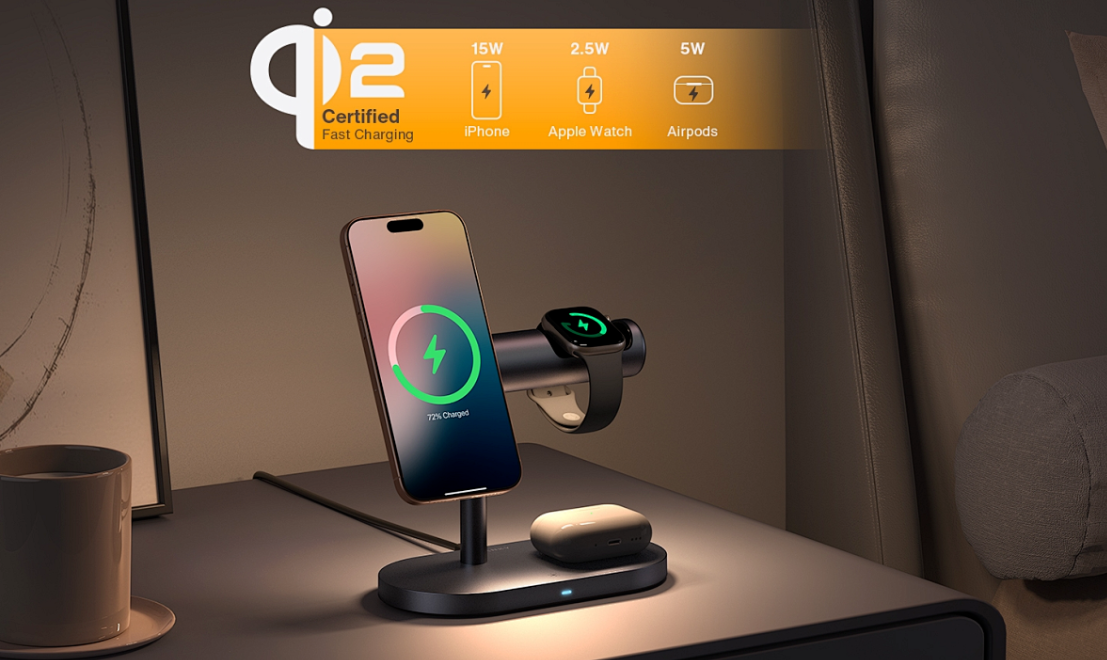
A Qi2-certified 3-in-1 charging station: phone, watch, and earbuds — all powered without a single visible cable
1. The Speed Threshold That Changed Everything
For years, the argument against wireless charging was simple: it's too slow. A 5W Qi pad took three hours to fill an iPhone. A 7.5W pad barely kept pace with background drain during navigation. The cable was faster, so the cable stayed.
That argument died on April 15, 2026. The Qi2.2 specification delivers 25W magnetic wireless charging — the same power level that Samsung and Apple ship as their default wired adapters. In practical terms, an iPhone 17 Pro charges from 0% to 50% in approximately 30 minutes on a Qi2.2 pad, virtually identical to plugging in a USB-C cable. Samsung's Galaxy S26 Ultra reaches 65% in the same window.
But here's the part most people miss: the speed parity didn't just eliminate the performance argument — it eliminated the visual argument. When wireless was slow, you kept a cable on your nightstand "just in case." That cable — coiled, fraying, tangling with your watch band — was the anchor that kept your space looking like a tech repair bench. Now that Qi2.2 matches wired speed, the cable has no reason to exist. And when the cable disappears, the entire room transforms.
Why 25W Is the Magic Number
The jump from 15W (Qi2 v1.0) to 25W (Qi2.2) isn't just incremental — it's the threshold where wireless charging shifts from "convenient overnight trickle" to "I can top up during a 20-minute coffee break and get a full afternoon of use." This behavioral change is what makes the cable permanently removable from every surface in your home.
This shift has already been documented in depth. As our analysis of Qi2.2 25W's arrival explains, when wireless speed matches wired, the last practical justification for visible charging infrastructure evaporates. The question is no longer "Can I go wireless?" — it's "Why haven't I already?"
2. Room 1: The Bedroom — Your Nightstand Without Cables
The bedroom is where the invisible power grid begins — and where its impact is most intimate. Your nightstand is the last thing you see before sleep and the first thing you reach for in the morning. It deserves to be serene, not strangled by cords.

A bedside 3-in-1 charging station with integrated mood lighting — technology that enhances, rather than interrupts, the sleep environment
2.1 The Nightstand Reinvented
A 3-in-1 wireless charging station replaces three cables and three power adapters with a single, sculptural object. Your phone sits upright (perfect for that 2 AM alarm glance), your watch hangs at the correct angle, and your AirPods rest in their designated cradle. The entire footprint is smaller than a hardcover book.
But the real transformation isn't the hardware — it's the behavior. When you can place your phone on a pad and get a 50% charge in 30 minutes, the ritual of "plugging in before bed" becomes "placing down before bed." The motion is lighter, the visual is cleaner, and the morning begins without a coiled cord reminding you of yesterday's anxiety.
As our deep dive into how Qi2 magnetic charging is killing bedroom cables demonstrates, the nightstand is ground zero for the wireless aesthetic revolution. The five scenarios outlined there — from the dual-device nightstand to the vanity charging corner — all share one principle: power is present, but never visible.
2.2 The Ultra-Thin Phone Meets the Ultra-Clean Surface
Apple's iPhone Air at 5.5mm thin represents a design philosophy: devices should disappear into your life, not dominate it. The same philosophy now applies to how we charge them. A MagSafe-compatible charging pad with magnetic alignment means your phone snaps into the perfect position every time — no fumbling, no "is it charging?" anxiety, no micro-adjustments at 11 PM.
The iPhone Air's encounter with MagSafe isn't just a product pairing — it's a design manifesto. When the thinnest phone meets the cleanest charging method, the result is a nightstand that looks like a design object, not a charging station.

Sleep-friendly bedside charging: multi-device power without LED glare or cable clutter disrupting your rest
2.3 Sleep-Friendly Design Matters
A charging station in the bedroom must respect the environment it occupies. This means:
- No LED glare: Quality Qi2.2 stations dim or disable indicator lights after alignment confirmation
- Silent operation: No coil whine or vibration — the only sound in your bedroom should be silence
- Foreign object detection: Qi2.2's mandatory FOD prevents accidental charging of keys, coins, or jewelry left on the pad
- Temperature management: Smart thermal throttling keeps the pad cool enough to touch, even during 25W fast charge
These aren't luxury features — they're non-negotiable design requirements for any device that shares your sleeping space. A charging station that lights up your room like a runway or hums like a transformer has no business being three feet from your pillow.
3. Room 2: The Living Room — Surfaces That Serve Silently
The living room is the most public space in your home — and the most unforgiving of visual clutter. A charging cable draped across a coffee table is an aesthetic violation in any design language, from mid-century modern to Scandi minimalism. But devices still need power. The solution: surfaces that charge.
3.1 The Coffee Table That Powers Your Evening
Imagine this scene: You're watching a movie, your phone is at 12%, and you don't want to get up. With a Qi2.2 pad embedded in your side table, you reach over, place the phone down, and within 30 minutes it's at 50% — all without breaking eye contact with the screen or breaking the visual flow of the room.
The key is form factor. A flat, fabric-covered Qi2.2 pad in slate grey or oatmeal beige doesn't look like a charger — it looks like a coaster. A leather-wrapped charging tray doesn't announce "technology lives here" — it says "this is where your things belong." The best charging accessories for living spaces are the ones your guests never identify as tech.
3.2 The Console and Shelf Integration
For families with multiple devices, a 3-in-1 charging station placed on a console table or bookshelf serves as a communal charging hub without visual disruption. The vertical orientation of a well-designed stand means it occupies the same visual footprint as a small picture frame or a decorative box. When not actively charging, it simply becomes part of the room's architecture.
The five trends from cable chaos to wireless aesthetic hub outline this shift clearly: charging is moving from a dedicated "tech corner" to an ambient, distributed presence throughout the home. The living room is where this distributed model shines brightest.
3.3 Guest-Ready Charging
A living room with a wireless charging pad is a living room that says "make yourself at home" — without the awkwardness of asking "do you have a charger?" When a guest places their phone on the side table and it starts charging automatically, the room extends a small, silent hospitality that no cable dangling from a wall outlet can replicate.
4. Room 3: The Home Office — The Cable-Free Productivity Zone
Your desk is where focus lives — and where cable chaos goes to die. A 2026 workspace survey found that 73% of remote workers cite "cable clutter" as their primary source of desk-related visual stress. The irony is sharp: the very tools designed to make you productive are the ones making your space feel chaotic.

A minimalist workspace where wireless charging integrates seamlessly into the Apple ecosystem — desk, devices, and power in harmony
4.1 The Single-Station Strategy
Instead of running three cables to three devices, a Qi2.2 3-in-1 charging station replaces all of them with one elegant object. Phone, watch, and earbuds charge simultaneously on a device smaller than a monitor stand. The result: your desk has zero cables running to personal devices — only the essential monitor, keyboard, and mouse connections remain.
Our feature on how wireless charging is reshaping the 2026 efficient workspace documented this shift across multiple desk configurations. The pattern is consistent: removing charging cables from the desk surface reduces perceived clutter by 40–60%, even when total cable count only drops by 2–3. The visual impact is disproportionate because charging cables are the ones that move — they're the ones that tangle, drape, and catch your eye.
4.2 The "Charge While You Work" Flow
With 25W Qi2.2, the workflow shifts fundamentally. You no longer need to "stop and charge." Instead:
- Morning drop: Place your phone on the charging stand when you sit down. By the time you finish your first meeting, it's gained 40%+
- Active charging: Your phone stays visible and upright on the stand, doubling as a notification display while it charges
- Afternoon swap: When your watch hits 20% during the afternoon slump, drop it on the integrated watch charger for a quick boost
- End of day: Everything is already charged. You leave your desk and take fully powered devices with you
This is the invisible power grid at its most productive: charging happens in the spaces between tasks, not as a task itself.
5. Room 4: The Entryway — Drop, Charge, Leave
The entryway is the most overlooked charging zone in the home — and the most obvious one in hindsight. It's where you arrive, where you leave, and where your devices should always be ready to go.

From cable chaos to clean workspace: the transformation that Qi2.2 wireless charging makes possible
5.1 The Drop Zone
A wireless charging pad on the entryway console creates a natural habit loop: walk in, drop phone, remove shoes, hang keys. By the time you've transitioned from "outside mode" to "home mode," your phone has already gained 15–20%. When you leave, it's ready. No cable hunting, no "I forgot to plug it in," no 12% battery panic at the front door.
5.2 The Shared Family Hub
For households with multiple people, the entryway charging station becomes the communal power node. A 2-in-1 or 3-in-1 charging stand handles the most common family devices — two phones and a set of earbuds, or a phone, a watch, and a headset. The magnetic alignment of Qi2.2 means even kids can "place and go" without needing to find the exact charging position.
6. The Five Design Principles of Invisible Charging
Transforming your home into an invisible power grid isn't about buying more gadgets — it's about following five principles that ensure technology enhances your space rather than occupying it.
| Principle | Description | Application |
|---|---|---|
| 1. Surface Continuity | Charging pads should match or complement the surface they rest on | Fabric pads on wood tables; leather trays on consoles; matte finishes on stone |
| 2. Vertical Minimalism | Choose stands over flat pads when vertical space is available | 3-in-1 vertical stands on nightstands and desks save horizontal space |
| 3. Light Discipline | No visible LEDs in sleep-adjacent spaces | Bedroom and living room chargers must dim or disable indicators |
| 4. One-Cable Rule | Each charging station connects to power with exactly one cable, hidden from view | Route cables through desk grommets, behind furniture, or under cable trays |
| 5. Behavioral Placement | Position chargers where devices naturally land, not where cables can reach | Nightstand, desk corner, entryway console — not "next to the wall outlet" |
The One-Cable Rule in Practice
Here's the mental shift: instead of asking "where is the outlet?" ask "where do I put my phone down?" A 3-in-1 charging station needs only one power cable. Hide that single cable behind furniture or through a cable management channel, and your room is functionally cable-free. One cable, hidden, powering three devices — that's the math of invisible charging.
As the analysis of Qi2.2's impact on home design makes clear, 25W wireless charging doesn't just match wired speed — it unlocks a design language where power is assumed, not displayed.
7. What to Look for in a Qi2.2 Charging Station for Home
Not all Qi2.2 chargers are created equal. For home aesthetics applications, prioritize these features:
| Feature | Why It Matters for Home Use | What to Check |
|---|---|---|
| Qi2.2 Certification | Guarantees 25W magnetic alignment and safety compliance | Look for the official Qi2 logo; verify on WPC's certified product list |
| 3-in-1 or 4-in-1 Design | Single device handles phone, watch, and earbuds — one cable, one object | Confirm Apple Watch compatibility (MFi) and earbuds case fit |
| LED Dimming/Disable | Critical for bedroom and living room placement | Auto-dim after alignment, manual disable option, or no LED at all |
| Foreign Object Detection | Prevents accidental heating of metal objects left on the pad | Qi2.2 mandates FOD, but quality varies — check reviews |
| Thermal Management | 25W generates more heat; smart throttling keeps surfaces safe | Look for GaN + Apple Pi dual-chip protection and active temperature monitoring |
| Material and Finish | Determines whether the station looks like tech or like furniture | Fabric, leather, or matte finishes over glossy plastic |
| Clock Display | Adds functional value to bedside placement | Adjustable brightness, auto-off timer, clean digit design |
The ELECDOV Approach
ELECDOV's home charging line was designed around these principles from the start. The CE19S series offers Qi2.2-certified 3-in-1 charging with integrated clock, LED auto-dim, and a minimalist matte finish that belongs on any nightstand. The CE06S provides the same wireless power in a foldable form factor for entryway and living room flexibility. Both share a single design DNA: power that respects the space it occupies.
8. Core Q&A
Q1: Is 25W Qi2.2 really as fast as wired charging?
Yes, for everyday use. Qi2.2 delivers 25W, which matches the wattage of the default chargers included with most flagship phones. An iPhone 17 Pro reaches 50% in ~30 minutes on Qi2.2 — virtually identical to USB-C. The only scenario where wired still wins is with proprietary super-fast protocols (like 45W Samsung wired or 80W OnePlus wired), but these require specific cables and adapters that most people don't carry around the house.
Q2: Can I charge through my phone case?
Mostly yes. Qi2.2's magnetic alignment works through cases up to ~5mm thick. MagSafe-compatible cases with built-in magnet rings provide the strongest alignment. Thin clear cases, silicone cases, and leather cases all work without issue. The main exceptions are very thick rugged cases, metal cases, and cases with metal plates or card holders between the phone and the charger.
Q3: Do I need a special power adapter for Qi2.2?
Yes — a 30W+ USB-C PD adapter is recommended. While the charger delivers 25W to the device, the power supply needs overhead for efficiency losses. Most Qi2.2 stations don't include a wall adapter, so check the included accessories. A 30W or 45W GaN adapter is ideal — small, efficient, and future-proof.
Q4: Is it safe to charge overnight on a wireless pad?
Yes, with certified Qi2.2 hardware. Modern wireless chargers include overcharge protection, temperature monitoring, and automatic power reduction when the battery reaches 80–100%. Qi2.2 certification requires passing WPC's safety test suite, which includes thermal runaway prevention and foreign object detection. The risk with overnight charging comes from uncertified, ultra-cheap pads — not from properly certified hardware.
Q5: How many charging stations do I actually need?
Three covers most homes: one for the bedroom (3-in-1: phone, watch, earbuds), one for the home office desk (same configuration), and one for the entryway or living room (2-in-1 or 3-in-1). This three-station model ensures every device has a charging home, no cables are visible, and you're never more than a few steps from a power boost.
Q6: Will Qi2.2 work with future phones, or will I need a new charger?
Qi2.2 is designed for long-term compatibility. It's the current flagship specification from the WPC, and all major phone manufacturers (Apple, Samsung, Google, Xiaomi, OPPO) have committed to Qi2 compatibility through their next several device generations. A Qi2.2 charger you buy today will work with phones released through at least 2028–2029. The magnetic alignment standard is particularly future-proof — it's based on the same physical principle that MagSafe uses, which Apple has maintained across every iPhone since 2020.
Conclusion
The invisible power grid isn't a futuristic concept — it's the reality of any home equipped with Qi2.2-certified wireless charging in April 2026. When every surface can charge at wired speeds, when every room has a dedicated power point that looks like furniture, and when the last cable disappears from your nightstand, you don't just gain convenience. You gain visual calm, spatial clarity, and a home that feels designed — not wired.
Related Articles
- Qi2.2 25W Arrives: The End of Wired Charging on Your Desk — Understanding the 25W leap from theory to desk
- Qi2 Magnetic Charging Is Killing Bedroom Cables: 5 Real Scenarios — How magnetic alignment reshapes bedside power habits
- Qi2.2 Meets Home Design: 25W Wireless Charging in Bedroom & Living Room — The aesthetic freedom unlocked by speed parity
- Five Trends: From Cable Chaos to Wireless Aesthetic Hub — The nightstand's transition from tech station to design object
- iPhone Air Meets MagSafe: Designing the Wireless Nightstand — How the thinnest phone demands the cleanest charging

Elecdov Technical Team
Retail, Wholesale, Customization, After‑sales, Repair, Joint Cooperation, One‑stop Service
Looking for a customized solution?
Our team offers free, tailored charging solution design services.
Get Free Consultation


